Track Survey Completion
You can monitor progress from the Survey list.
Common statuses include:
Active
Invted
Completed
Optout
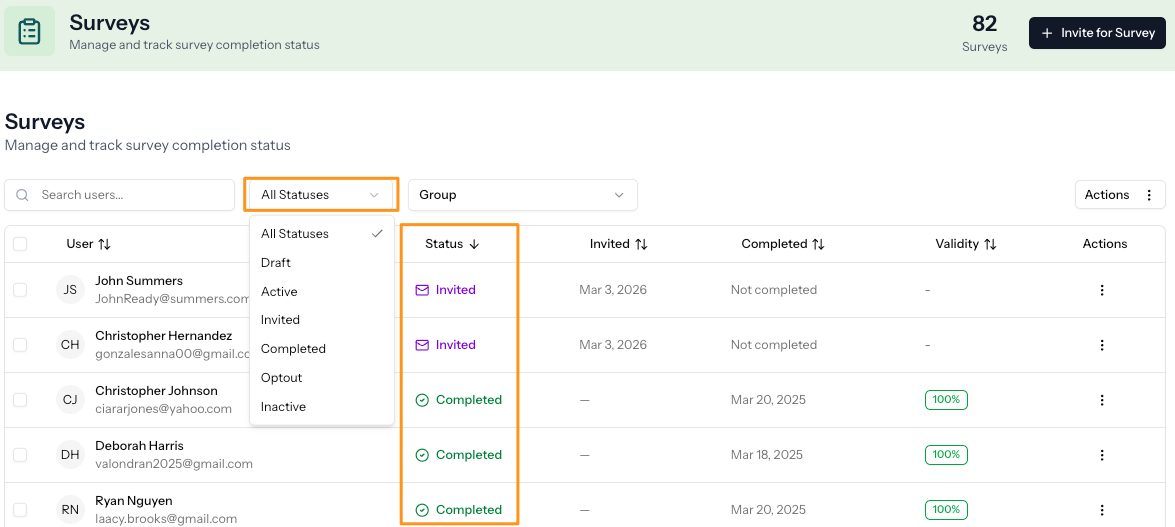
Once the survey is completed, the results become available in the platform.
View Results
Select the overflow menu (⋮) next to the participant’s name.
Select how you wish to view results (via Snapshot, Measure or Generate Report).
Review and prepare for a follow-up conversation.
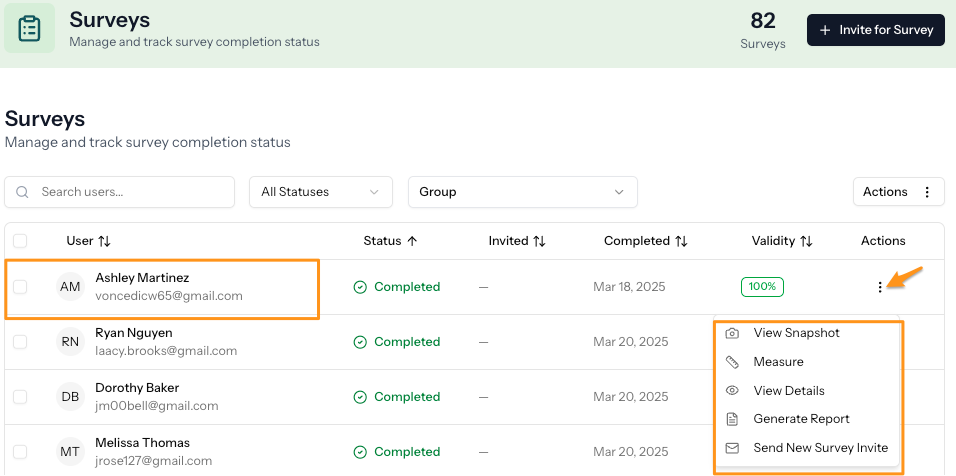
You can share results with the participant based on your account settings and role permissions.
If the Participant Didn’t Receive the Survey
See:
Participant Didn’t Receive the Survey Email
How to Resend a Survey Invite
What Happens Next?
After reviewing results, you can:
Schedule a debrief conversation
Share reports with the participant
Use insights to guide development planning
Was this article helpful?
That’s Great!
Thank you for your feedback
Sorry! We couldn't be helpful
Thank you for your feedback
Feedback sent
We appreciate your effort and will try to fix the article