Learn how to send reminders for incomplete surveys or invite participants to retake a survey for development comparison.
Send a Reminder to a Participant
If a participant has not completed their survey, you can resend the invitation email directly from the Surveys page.
Step 1: Open the Surveys Page
Navigate to Surveys from your dashboard.
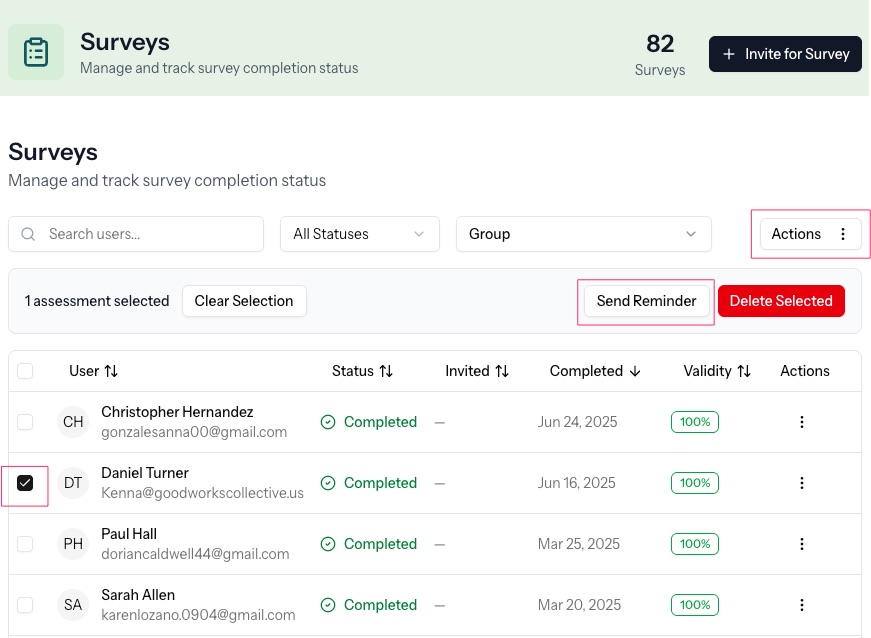
Step 2: Select the Participant
Locate the participant(s) in the list, or search on survey status.
Check the box to the left of their name(s).
Once selected, action buttons will appear at the top of the table.
Step 3: Click “Send Reminder”
Click Send Reminder.
The system will resend the original survey invitation email to the participant.
That’s it. No new link is created — the original survey link remains active.
When Should You Send a Reminder?
Use this when:
The survey status shows Invited
The participant says they didn’t receive the email
The link has not expired
You want to prompt completion without restarting the survey
Retaking a Survey (Resurveying)
If you want a participant to complete the survey again (for development tracking or reassessment), you do not send a reminder.
Instead:
Click Invite for Survey
Send a new survey invitation
The system will create a new survey instance for that participant
This allows growth comparison over time.
Important Distinction
| Action | What It Does |
|---|---|
| Send Reminder | Resends the original invitation for the same survey |
| Invite for Survey | Creates a brand-new survey instance |
Reminders nudge completion.
New invitations track development.
Was this article helpful?
That’s Great!
Thank you for your feedback
Sorry! We couldn't be helpful
Thank you for your feedback
Feedback sent
We appreciate your effort and will try to fix the article