The survey link allows you to share an IRIS survey directly with participants by email, text message, learning platform, or another secure system.
Use this method when you want a simple, flexible way to distribute a survey link without sending individual invitations through IRIS. This can be especially helpful for large groups, workshops, live sessions, or organizations that prefer to manage communication outside the platform.
Step 1: Generate or Copy the Survey Link
- Click the building icon in the upper-right corner of IRIS.

- Click "Groups" (left-hand side) and open the group.
- Find and click on the group you want participants to join.
- Click the black Registration Link button on the right side of the page.
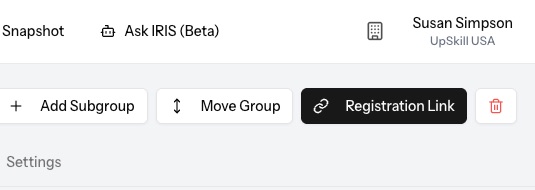
- The survey link will be copied and can be pasted into an email, text message, learning platform, or secure internal page.
Before sharing the link, make sure you are copying the link for the correct group.
Step 2: Share the Link with Participants
You can share the survey link in several ways, including:
- Text message
- Learning platform
- Secure internal webpage
- Workshop or live-session materials
Participants will use the link to access and complete the IRIS survey through the secure survey interface.
Tracking Survey Completion
Survey responses submitted through a shared link are recorded in your IRIS account and can be tracked from the Surveys list.
One important difference with this method is that participants are not visible as invited in IRIS before they begin the survey. You will only see their survey status once they actively start or complete the survey.
Important Considerations
Because the survey link is not a one-time invitation link, there are a few things to keep in mind:
- Participants enter their own name and email address. If they misspell their name or email, it may be more difficult to locate their record later.
- The link can technically be forwarded or shared with others. Anyone with access to the link may complete the survey under your account.
- You will not see a system record indicating that a person was invited until they begin the survey.
- This method gives you distribution flexibility, but slightly less control than sending individual invitations through IRIS.
For these reasons, the survey link method is best when ease of access matters more than tight invitation tracking.
Participant Reports
After completing the survey, participants may receive a brief summary view or report from IRIS.
This summary is not the same as the coaching reports, team views, or account-level reporting available inside the IRIS platform. Any official coaching reports should be accessed and managed by the appropriate IRIS account administrator, coach, or practitioner.
When to Use the Survey Link Method
This method is useful when you want to:
- Survey a large group
- Send a link by email or text
- Embed the survey link in another system
- Include the link in workshop materials
For situations where you need tighter tracking, personalized invitations, or clearer records of who has been invited, sending individual survey invitations through IRIS may be the better option.
Video Walkthrough
Watch the video below to see how to find and copy the registration link for a group.
Was this article helpful?
That’s Great!
Thank you for your feedback
Sorry! We couldn't be helpful
Thank you for your feedback
Feedback sent
We appreciate your effort and will try to fix the article