The Dashboard is your command center. It shows what’s happening right now—survey activity, recent results, and organizational progress—so you can take action quickly.
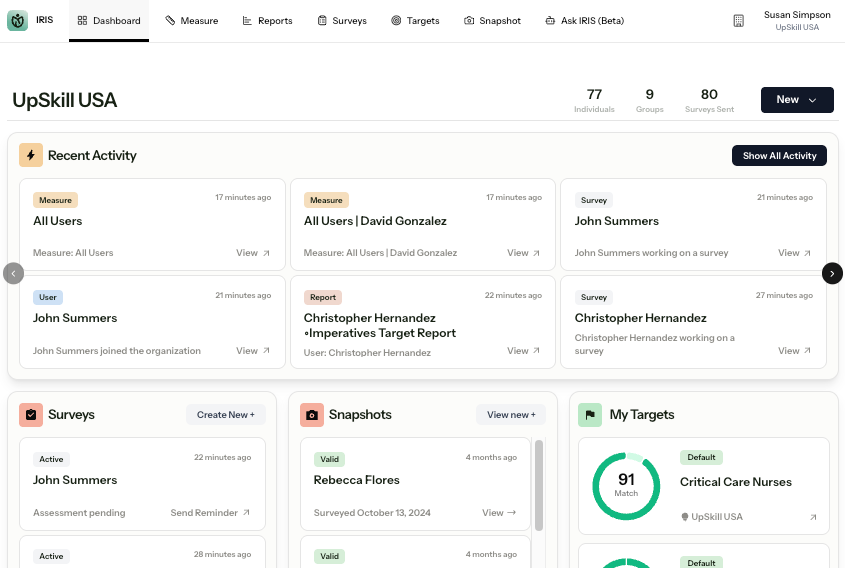
The Top Navigation
Across the top of the platform:
- Dashboard — Real-time overview of activity
- Surveys — Send surveys and monitor completion
- Measure — Explore detailed behavioral data
- Reports — Generate and download reports
- Targets — View and manage benchmarks
- Snapshots — Quick-view participant summaries
- Ask IRIS (Beta) — AI-powered insight (if enabled)
Your available sections depend on your assigned role.
What You See on the Dashboard
The Dashboard is designed to help you quickly see what is happening in your account and take action when needed.
Recent Activity
The Recent Activity section shows recent system activity in your account, such as:
- Survey completions
- Reports generated
- Measurement views
Use this section to monitor engagement and see what has happened most recently.
Surveys Panel
The Surveys panel gives you a quick view of survey activity, including:
- Active surveys — surveys that have been started but not completed
- Recently completed surveys — surveys completed by participants
- Invited surveys — invitations sent directly through the IRIS platform that have not been started yet
To send a new survey invitation from the dashboard, select Create New.
The layout is designed for visibility and action.
Note: If you share a general survey link outside of IRIS, those people will not appear as “Invited” before they begin. The system can only track them once they click the link and start the survey.
Snapshots Panel
Shows recent Snapshot results.
Select View New to generate or access additional Snapshot views.
My Targets
Displays active organizational Targets and associated match scores.
This helps you track alignment to internal or benchmark profiles.
Organization Overview
Provides high-level metrics:
Total reports generated
Total surveys sent
Number of active targets
Total measurement views
A Survey Status chart shows:
Completed
Active
Invited
Cancelled
Use this section to quickly assess overall participation and progress.
Using the Overflow Menu (⋮)
Throughout the platform, the three-dot menu provides quick actions such as:
View Snapshot
Open Measure
Generate Report
Send Survey Invite
When in doubt, look for the three dots.
Quick Tips
Use the New button (top right) to start common actions.
If you don’t see a feature, check your assigned role.
See Roles in IRIS for permission details.
Next Steps
Explore the Measure Section
Manage Users and Groups
Was this article helpful?
That’s Great!
Thank you for your feedback
Sorry! We couldn't be helpful
Thank you for your feedback
Feedback sent
We appreciate your effort and will try to fix the article